 Quoted on SEO and content by the Shopify blog, MarTech, and other industry-leading publications

Most technical SEO processes are built around driving traffic. Ours is built to drive revenue.
For a lot of businesses (and, surprisingly, SEO agencies), those two things feel like the same goal. They’re not.
A bunch of things can go wrong between a shopper finding your site and actually buying something. A standard technical SEO audit usually doesn’t catch them.
Ours will, and we’ll show you what it looks like.
Key Takeaways
- Traditional technical SEO audits were built for websites, not ecommerce stores. The standard checklist covers page speed, crawl errors, redirect chains, and other foundational issues, but aren’t always designed for a store with an inventory that changes daily.
- Search is changing, and your audit process needs to change with it. Google Shopping, AI tools, and zero-click channels all affect whether your store gets found, and most technical audits aren’t built with that in mind.
- Intergrowth’s ecommerce technical SEO process is built around driving revenue in a changing search landscape. We go beyond the standard checklist to audit Google Merchant Center feed health, product and variant images, and your brand’s overall reputation online. Most agencies don’t take these steps because they’ve historically fallen outside of the “SEO” umbrella.
What Does Ecommerce Technical SEO Usually Look Like?
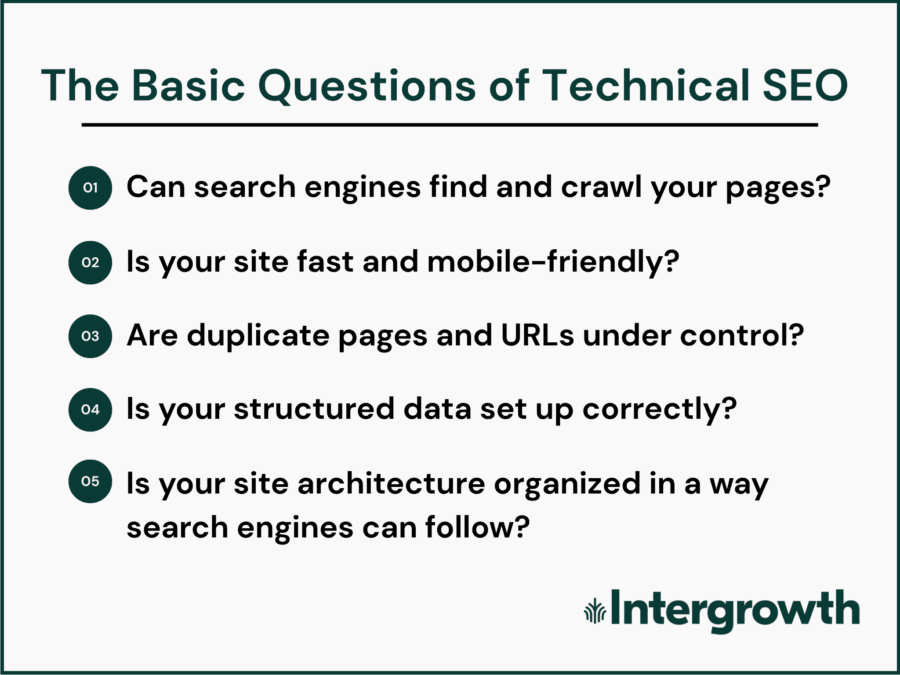
Most technical SEO audits cover the same short list of items:
- Crawlability and indexability
- Site speed and mobile-friendliness
- Duplicate pages
- Broken links
- Structured data and schema markup
- Site architecture
Plus maybe a few other things.
And those bullets above are all very important. They’re the foundation of our process, too.
But for an ecommerce site in 2026, they’re only the starting point. Most agencies stop here, and that leaves a gap between traffic and sales.
A Standard Technical SEO Process Isn’t Enough for Ecommerce Anymore
Here are a few reasons why we’ve expanded our technical SEO process to include a lot of work that’s not traditionally thought of as “search engine optimization”:
- Ecommerce websites are more technically complex than other websites: The more product pages (PDPs), filtered URLs, and inventory turnover you have, the more room there is for something to break.
- Ecommerce stores are built to sell, not just inform: A SaaS company captures a lead and hands it off to a sales team. Ecommerce doesn’t have that handoff. When a shopper lands on a page, that page has to close the sale.
- Google Shopping has made product feed quality an SEO concern: A store with disapproved or incomplete listings in the Merchant Center feed won’t show up in Shopping Results, no matter how clean its technical foundation is.
- AI search tools have changed how shoppers discover products: ChatGPT and Perplexity evaluate your policies, your FAQs, and your overall store quality when deciding whether to recommend your products.
Those things all mean that a traditional technical audit just doesn’t have the same impact for ecommerce stores as it might for a SaaS or professional service website.
Related: Ecommerce SEO vs. “Regular” SEO (and How AI Is Changing Them Both)
Here’s How Intergrowth® Runs Technical SEO Audits for Ecommerce Websites
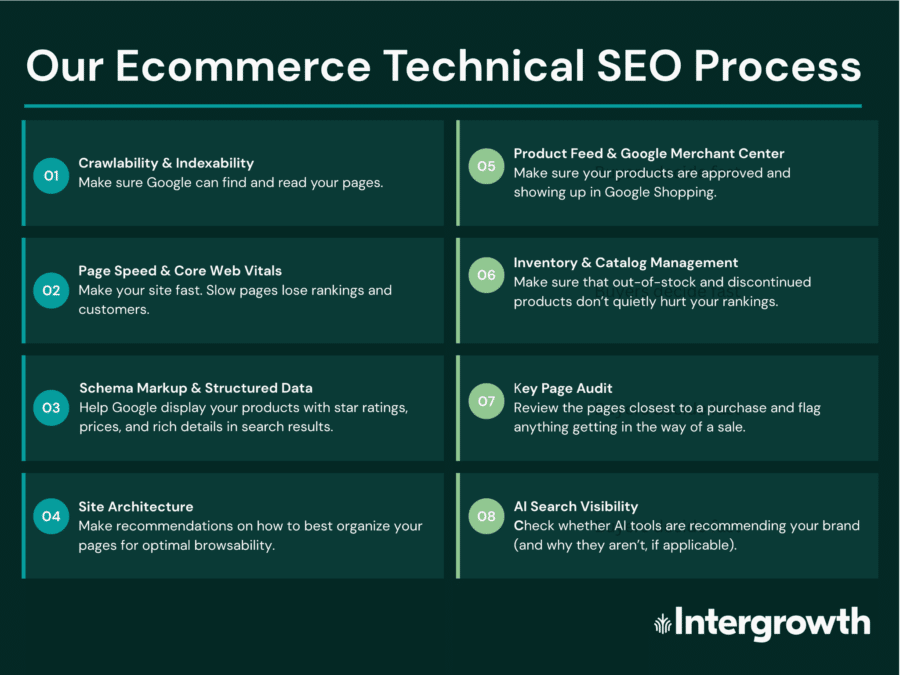
The beginning of our technical SEO checklist looks pretty standard.
We start by auditing the items that most agencies cover:
- Crawlability and indexability: Can search engines find and index your pages?
- Site speed, Core Web Vitals, and mobile optimization: How fast does your site load, and how well does it work on a phone?
- Structured data and schema: Are your pages accurately displayed in search results?
- Site architecture and URL structure: Are your most important pages easy for search engines (and human shoppers) to find?
Those audit items will tell you whether your site has a healthy foundation. But they won’t tell you whether it’s set up to sell.
That’s what the categories below are for:
- Product feed and Google Merchant Center: Are your products approved to appear in Google Shopping results?
- Inventory and catalog management: What happens to your product description pages when SKUs go out of stock, get discontinued, or go seasonal?
- Key page audit: Are your most important pages set up to rank and convert?
- AI search visibility: Is your store set up to be found and recommended by AI search tools?
A lot of these tasks traditionally belong in a UX or CRO audit, which is why many SEOs ignore them. But if your visitors can’t find the products they need when they arrive on your site, you won’t see any ROI on your SEO investment.

Now let’s walk through the layers of our technical SEO audit process:
1. Crawlability and Indexability
Crawlability is about access. Can search engines reach your pages and pull information from them?
Indexability is about what Google does once it understands a page. Does it add it to search results?
If anything blocks a search engine from crawling or indexing your page, it won’t show up in search.
Here’s what we audit for to make sure your most important pages are crawlable and indexable:
- HTTPS/SSL: Your site should load on https:// (with an “s” after http). That means it’s secure, and browsers will flag your site with a warning if you don’t have it.
- Robots.txt: This file tells search engines which pages to crawl and which to skip. Checkout and account pages should be blocked, while product, category, and blog pages should be crawlable.
- XML sitemap: A valid sitemap tells Google which pages exist on your site and helps it find them faster. We check that it loads correctly and is submitted in Google Search Console.
- Crawl errors: Google Search Console flags pages it couldn’t access. Any page flagged there may never appear in search results.
- Redirect chains: When one URL redirects to another that redirects to another, etc., load time increases and user experience suffers. We check that all redirects point directly to their final destination.
- Broken links: Internal and external links that lead nowhere tell Google the page they live on isn’t well maintained.
- Staging site indexation: If your store has a staging or development site, it should never appear in search. We check that it doesn’t.
- JavaScript rendering: Product content that loads via JavaScript may not be crawled correctly. We flag pages where this could be an issue.
If any of these are broken, fixing them is the first thing we do.
Related: An Ecommerce SEO Audit You Can Run Using Only Google
2. Site Speed, Core Web Vitals, and Mobile-Friendliness
Google measures how fast your site loads and how well it works on a phone. Pages that score poorly tend to rank lower. Pages that score well tend to get rewarded.
For ecommerce stores, this matters for sales, too. A slow product page will send your potential customers to another store, fast.
Here’s what we audit for:
- Core Web Vitals: Google’s rubric for measuring page speed and responsiveness. We run your key pages through Google’s PageSpeed Insights and flag anything scoring below the recommended threshold.
- Image file size and format: Oversized images are the most common cause of slow product and category pages (PLPs). We check that images are compressed and served in a fast-loading format like WebP.
- Lazy loading: Images that load only when a shopper scrolls to them improve page load times. We check that it’s enabled on pages with a lot of product images.
- Browser caching and CDN: These tools store versions of your pages closer to the user so they load faster. We flag if either isn’t in place.
- Mobile experience: Google indexes the mobile version of your site first (it’s a big ranking factor). We audit your store’s mobile experience and flag anything that makes it harder to browse or buy.
- Above-the-fold product imagery: Product images should be the first thing a shopper sees on a product or collection page. Text-heavy pages that push images below the fold lose shoppers before they see your products.
A fast, mobile-friendly store is foundational to any ecommerce SEO strategy.
3. Structured Data and Schema Markup
Structured data is code that helps Google understand what’s on your pages. It also helps search engines display your pages correctly in search results.
When shoppers use search engines, their clicks are influenced by product prices, availability, star ratings, and shipping information. Schema ensures they see that information.
Here’s what we audit for:
- Product schema: The most important structured data for any online store. We check that your product pages include accurate price, availability, and product details in a format Google can read.
- Review schema: Star ratings in search results are one of the more visible trust signals available to an ecommerce business. We check that customer reviews are marked up correctly so they’re eligible to appear.
- Breadcrumb schema: Breadcrumbs help Google understand how your pages are organized and display your site structure in search results. We check that they’re implemented correctly on product and category pages.
- FAQ schema: FAQ sections on product and category pages can appear as expandable results in Google search. We check that any existing FAQs are marked up to take advantage of that.
- Shipping and return policy schema: Google can pull shipping and return information directly from your pages and display it in Shopping results. Many stores never mark this up.
- Organization schema: Helps Google understand your brand and connect it to your social profiles and other online presence. Important for brand visibility in search and for AI tools evaluating your store’s credibility.
Structured data won’t fix a page that doesn’t deserve to rank, but it gives well-optimized pages a better chance of standing out when they do.
4. Site Architecture and URL Structure
Site architecture is how your store is organized. URL structure is how that organization appears in your visitor’s address bar.
Both affect whether Google can find your most important pages, and how much weight it gives them.
Here’s what we audit for:
- Page depth: Visitors (and search engines) should be able to reach your most important pages within a few clicks. Pages buried deep in your site structure are harder for Google to find and tend to rank lower.
- URL structure: URLs should be short, readable, and include the target keyword for that page. A URL like /collections/womens-running-shoes tells Google and your shopper exactly what the page is about. A URL like /collections/cat-238b tells no one anything.
- Faceted navigation: Filters on category pages (size, color, price) can generate new URLs every time a shopper uses them. Without the right controls in place, this can create hundreds of duplicate pages that waste crawl budget and can start to compete against each other for the same keywords.
- Pagination: Categories that span multiple pages need to be handled correctly. We check that paginated pages aren’t creating duplicate content or getting indexed when they shouldn’t be.
- Internal site search: Results pages from your store’s internal search function can get indexed by accident. They waste crawl budget and add pages to Google’s index that have no SEO value.
- Duplicate URLs: Parameter-generated URLs, session IDs, and other page variants can create duplicate versions of your pages without anyone noticing. We check for these and flag them.
- Internal linking: Your most important pages should have links pointing to them from other pages on your site. We check that product and category pages aren’t “orphaned,” meaning they exist on your site but are unreachable without a direct URL.
A well-structured site makes it easier for Google to find your most valuable pages and easier for shoppers to buy from them.
5. Product Feed and Google Merchant Center
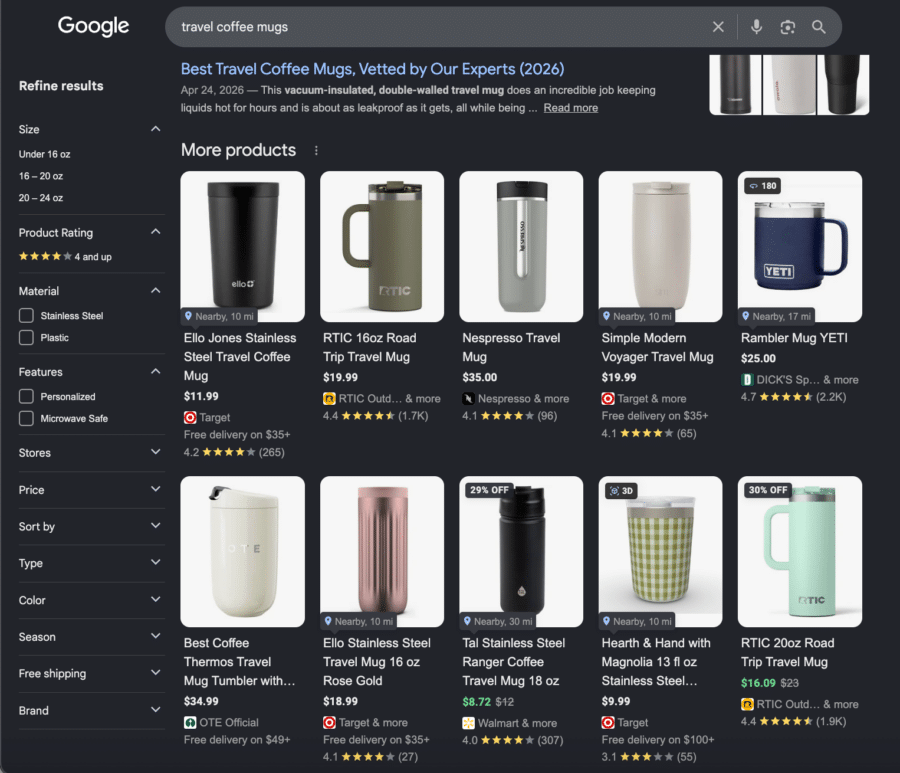
Google Merchant Center is a free tool that connects your product catalog to Google. When your products are approved, they’re eligible to appear in Google Shopping results, which are the non-sponsored listings with images, prices, and reviews that show up throughout a product search.
Here’s what we audit for:
- Account setup and health: We check that your Merchant Center account is properly connected to your store and that there are no account-level issues blocking your listings.
- Disapproved and flagged listings: Merchant Center flags products that don’t meet Google’s requirements. We check the Diagnostics tab for disapproved listings and identify the most common issues: missing product identifiers, policy violations, pricing mismatches, and incomplete information.
- Feed completeness: A complete product feed includes accurate titles, descriptions, images, pricing, availability, shipping information, and return policies. Missing or inaccurate fields prevent products from appearing in search.
- Product identifiers: GTINs and MPNs are unique product identifiers that help Google match your listings to its product knowledge graph. Missing identifiers on branded products are one of the most common reasons listings underperform.
- Competitive pricing: For stores that sell products other retailers also carry, pricing affects Shopping visibility. We flag products where competitors are significantly undercutting your price, since shoppers and Google tend to notice.
- Unique vs. manufacturer imagery: Product images pulled directly from a manufacturer are often identical to images on dozens of other retailer sites. Unique imagery stands out in Shopping results and is less likely to get lost in a pool of identical listings.
- Variant imagery completeness: If a product comes in multiple colors or styles, each variant should have its own image. A shopper searching for a green dress shouldn’t land on a page that only shows it in black.
A fully optimized Merchant Center feed is one of the fastest ways to improve Shopping visibility. Unfortunately, it’s one of the most commonly overlooked parts of an ecommerce SEO audit.
Related: The Ecommerce SEO Tools We Use Every Day
6. Inventory and Catalog Management
Ecommerce stores change constantly.
Products go out of stock. SKUs get discontinued. Seasonal collections go live in October and disappear in January.
Every one of those changes affects your SEO, and you need a process for managing them or the damage will accumulate.
Here’s what we audit for:
- One URL per product, one URL per collection: Every product and collection should have a single, canonical URL. We check for cases where the same product or collection exists at multiple addresses and set up canonical tags to tell search engines which to index.
- Out-of-stock product handling: When a product goes out of stock, the page should say so. We check that out-of-stock pages stay live until they’re discontinued, at which point they’re redirected to a relevant page so any backlink value is preserved.
- Duplicate product pages: We’ve seen stores that create a new page every time a product comes back in stock rather than updating the existing one. That creates duplicate content, splits backlink equity, and wastes crawl budget. We check for this and flag it.
- Seasonal page management: Pages built for seasonal promotions (holiday collections, sale events) should never just disappear at the end of the season. We check that seasonal pages are either kept live year-round with updated content or handled in a way that preserves their SEO value.
Good catalog management will help you avoid SEO problems and build authority for your pages over time instead of starting from scratch every season.
7. Key Page Audit
Search engine rankings and organic traffic mean nothing if your pages aren’t set up to convert when people land on them.
This part of our audit looks at the pages most likely to drive revenue: category pages, product pages, and any other pages closest to a purchase decision.
We flag any issues likely to prevent them from doing their job.
Here’s what we audit for:
- Title tags and meta descriptions: Every key page needs a unique title tag that includes its target keyword and a meta description that gives shoppers a reason to click. We check that these exist, are accurate, and aren’t duplicated across pages.
- Heading structure: Every page should have a single H1 that clearly describes what it’s about, followed by H2s and H3s that organize the content beneath it. We flag pages with missing, duplicate, or out-of-order headings.
- Keyword cannibalization: Each key page should be optimized for a specific search term that buyers actually use. We check that category and product pages are targeting the right keywords and that no two pages are competing for the same term.
- Original product descriptions: Manufacturer copy appears on every retailer site that carries the same product. Original descriptions give your pages a competitive edge in search and speak directly to your customer’s actual questions.
- Category page content: A category page with nothing but a grid of products gives Google very little to work with. We check that key category pages have enough content, including FAQ sections where relevant, to help Google understand what they’re selling.
- Trust signals: Shoppers deciding whether to buy from a store they don’t know are looking for reassurance. We check that key pages include visible trust signals like return policies, shipping times, customer reviews, and payment security.
- Internal linking: Key pages should link to related products, categories, and content. They should also have links pointing back to them from elsewhere on the site. We check that your most important pages aren’t isolated.
These are the pages that turn SEO traffic into revenue, so it’s important to get them right.
8. AI Search Visibility
AI search tools like ChatGPT, Perplexity, and Google’s AI Overviews are changing how shoppers discover and evaluate products. The LLMs that power these tools don’t just crawl your website to decide what to rank, they evaluate your brand’s overall presence and decide whether to recommend it.
Many technical SEO audits don’t account for this at all.
Here’s what we audit for:
- FAQ coverage on category and product pages: AI tools pull from structured Q&A content when answering shopping queries. We check that your key pages answer the questions shoppers are most likely to ask before buying.
- Shipping and returns policy pages: A clearly structured, easy-to-find policy page is one of the signals AI tools use to evaluate whether a store is worth recommending. We check that yours is indexed, accurate, and easy to parse.
- Brand entity optimization: AI tools research your brand the way a shopper would: checking reviews, reading third-party mentions, and evaluating your overall presence. We check that your organization schema is in place and that your brand information is consistent across the web.
- LLM brand perception: We run our LLM Sentiment Analysis to understand how AI tools like ChatGPT and Perplexity perceive your brand. This process flags reputation issues that traditional SEO tools miss entirely and gives us a baseline for improving your AI visibility over time.
SEO and AI best practices overlap significantly. A store that’s set up to rank well in Google is already most of the way there, but these additional steps make sure nothing falls through the cracks.
Read more: AEO Means Doing SEO Better
Let’s Make Sure Your Ecommerce Store Appears in Search Engines and AI Tools
Let’s schedule a call.
We’ve helped dozens of brands turn organic search into their biggest growth channel.
And the process above is part of how we did it.
SCALE YOUR ORGANIC TRAFFIC
Subscribe to our monthly newsletter