 Quoted on SEO and content by the Shopify blog, MarTech, and other industry-leading publications

- 1. The Quick Audit
- 2. The More In-Depth One
Table of Contents
SEO errors are easy to miss.
A slow-loading page, a missing SSL certificate, a title tag that just says “Home.”
They don’t feel urgent, but they’re SEO issues that hurt your organic traffic over time.
Let’s fix them.
We created this ecommerce SEO audit guide to help you get more customers from organic search.
It’s a distilled version of the process we used to help grow ecommerce businesses like JS Dental Lab, Cierto Tequila, and APEX Ski Boots.
Part One covers some items you can check for free in your browser. Part Two covers a more in-depth (and time-intensive) audit checklist that requires some paid tools.
Part One: An 11-Step DIY Ecommerce SEO Audit
Start here, regardless of your technical background:
- Confirm your site is secure.
- Make sure all versions of your domain lead to the same place.
- Check your robots.txt file.
- Verify your site appears in Google.
- Check that your sitemap exists and loads.
- Test your site speed.
- Audit Google Merchant Center listings.
- Check your meta tags and headings on key pages.
- Evaluate your category pages.
- Spot-check your internal linking.
- Evaluate your blog content (honestly).
Work through these steps in order. If something looks wrong, add it to your list of items to fix.
Step 1: Confirm Your Site Is Secure
Look for https:// in your browser’s address bar.
Your site either has this or it doesn’t.
Google uses HTTPS as a ranking signal. It tells them your site has an SSL certificate, which means it’s hosted on a secure server.
Browsers flag non-secure sites to visitors with a warning they can’t miss. For an online store asking customers to enter payment information, that warning ends the sale.
How to fix it: Go to your website host and look for an option to enable SSL. It should be free.
Step 2: Make Sure All Versions of Your Domain Lead to the Same Place
Type four variations of your URL into a browser:
- http://yourstorename.com
- https://yourstorename.com
- http://www.yourstorename.com
- https://www.yourstorename.com
All four should end up at the same URL.
If they don’t, Google treats the different versions as separate pages with duplicate content. The SEO value your homepage has built up gets split across multiple addresses instead of being concentrated in one. You lose authority for no reason.
How to fix it: Talk to your developer or hosting provider. The goal is a single canonical URL, typically https://yourstorename.com or https://www.yourstorename.com, with everything else redirecting here.
Step 3: Check Your robots.txt File
Type yourstorename.com/robots.txt into your browser.
You should see a plain-text file. Something like this:
User-agent: *
Disallow: /checkout/
Disallow: /account/
This file tells search engine crawlers which pages on your site they’re allowed to access. Blocking checkout pages and account pages makes sense.
What you don’t want blocked are your product pages, category pages, and blog content.
What to look for: Any Disallow rule pointing toward pages you want people to find. If you see them, flag them for your developer.
Step 4: Verify Your Site Appears in Google
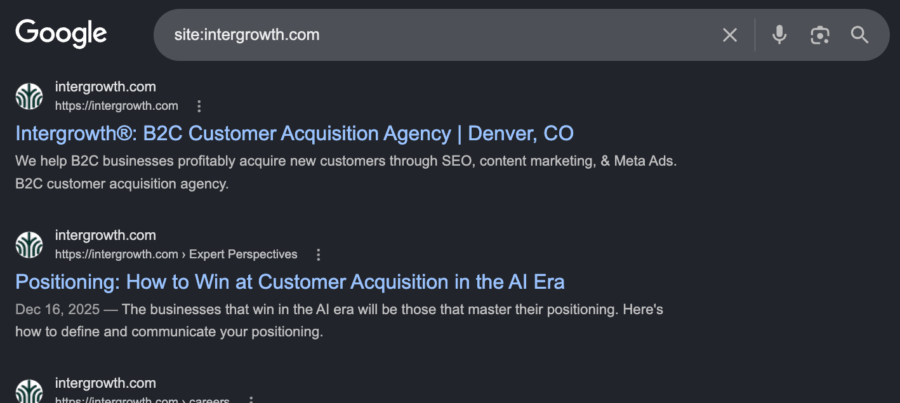
Go to Google and type site:yourstorename.com into the search bar.
Google will return a list of pages it has indexed from your site. If your homepage doesn’t appear, or if almost nothing shows up, Google may not be crawling your site properly.
While you’re there, scan the results. Do the titles and descriptions look accurate? Any pages with duplicate titles, strange URLs, or content that shouldn’t be public?
What to do if your site doesn’t show up: Start by reading this article, then set up Google Search Console and request indexing for your homepage. GSC is one of the most useful free SEO tools available.
See also: What Most Businesses Get Wrong About Indexability and Crawlability
Step 5: Check That Your Sitemap Exists and Loads
Type yourstorename.com/sitemap.xml into your browser.
An XML sitemap is a file that lists the pages on your site you want Google to index. It helps crawlers find content they might otherwise miss, especially for stores with hundreds of product and category pages. Shopify and most other ecommerce platforms generate one automatically.
What to do if you can’t find it: Check your robots.txt file. Many platforms list the sitemap location near the bottom. Once you’ve found it, submit the URL in Google Search Console under the Sitemaps section.
Hosting on Shopify? Here’s how to find the best Shopify agency for your ecommerce business.
Step 6: Test Your Site Speed on Mobile
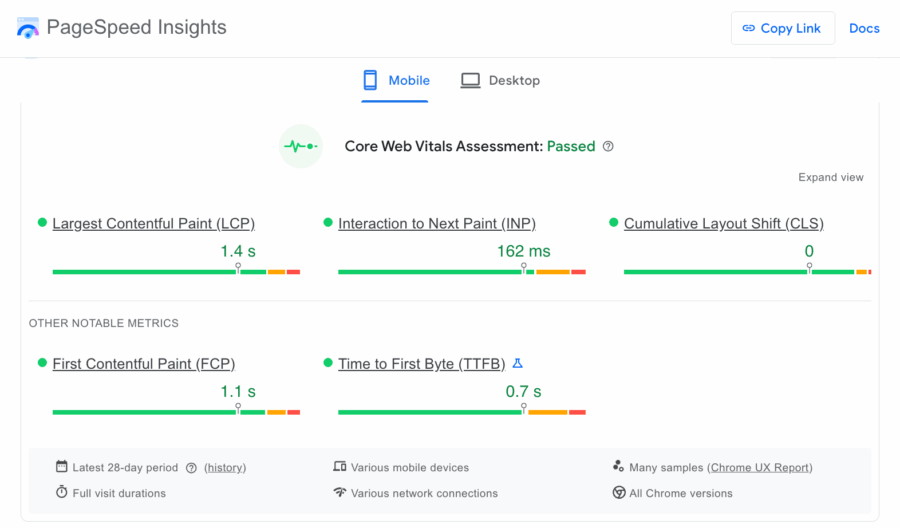
Go to PageSpeed Insights and enter your homepage URL. Run the test on mobile.
You’re looking for a score above 90. Below 60 is a problem worth addressing now.
Google indexes the mobile version of your site first and rewards mobile-friendly websites because more shoppers browse on phones than desktop. A slow experience can cost you keyword rankings, organic traffic, and ultimately sales.
What to do with the results: PageSpeed Insights flags specific issues under “Insights” and “Diagnostics.” Note anything flagged as high impact and pass it to your developer. They may need to enable caching, compress images, or minify any JavaScript to improve page functionality.
If the homepage has poor metrics, run the test on a few category pages. Performance issues are often worse on pages with a lot of product images. Read our article on Google’s Core Web Vitals rubric for more information about why this matters for SEO.
Step 7: Check Your Google Merchant Center Listings

Go to merchants.google.com and sign in or create a free account.
Google Merchant Center is where you tell Google about the products you sell on your ecommerce website. When your products are approved, they’re eligible to appear in Google Shopping results: the listings with images, prices, and reviews that appear at the top of many product searches.
It’s free, and it’s one of the more direct ways to get products in front of shoppers.
What to look for: Click the Products tab to see which listings are approved and which aren’t, along with the reason. Common issues include missing product images, incomplete descriptions, or pricing mismatches between your site and your feed. Disapproved listings don’t show up in search.
Related: Ecommerce SEO vs. “Traditional” SEO (and How AI Is Changing Them Both
Step 8: Check Your Title Tags and Headings on Key Pages
Right-click anywhere on a page and choose “View Page Source.” Use Ctrl+F or Command+F to search for <title>, then search again for <h1>.
The title tag is what Google displays as the clickable headline in search engine results pages (SERPs). The H1 is the heading at the top of your page. Both should tell visitors and search algorithms exactly what the page is about.
Check your homepage, your top category pages, and a handful of product pages. Ask yourself:
- Do these titles actually describe what’s on the page?
- Do they include a target keyword someone would search to find it?
- Is the title tag under 60 characters? (Anything longer may get cut off in search results)
A category page titled “Women’s Running Shoes” will outperform one titled “Products” for anyone searching for that term. It’s one of the most straightforward SEO fixes available.
Step 9: Evaluate Your Category Pages
Open two or three of your most important category pages. Pretend you’ve never been to your site before:
Ask yourself:
- Can I find what I’m looking for within a few seconds?
- Are product images the first things I see on the page?
- Are the product images large enough to evaluate at a glance?
- Are there filters to narrow by size, color, or price?
- Does anything feel cramped on the screen or hard to tap on a phone?
Google tracks what users do after they land on a page. Low dwell time (people leaving quickly without clicking) tells Google visitors aren’t getting what they came for. Search rankings tend to follow that page down.
The goal of a category page is to get products in front of people who want them. Anything that interrupts that, like too-small images or a dense block of intro text, is a UX problem and an SEO problem at the same time.
Step 10: Spot-check Your Internal Linking
Starting at your homepage, click through to your most important category pages. Count the number of clicks it takes to get there.
Internal links help visitors navigate and tell Google which pages on your site matter most. Pages that are hard to reach from the homepage tend to rank lower, not because the content is bad but because Google has fewer signals pointing toward them.
One of the most straightforward ways to optimize your conversion rate is to improve your user experience. If your most important pages are buried behind multiple menus or subcategories, that’s worth fixing.
Also: Check whether your blog posts link to relevant product or category pages. A post about how to choose a hiking boot should link to your hiking boot category page.
Step 11: Evaluate Your Blog Content (Honestly)
If you don’t have a company blog, start one. Publishing useful content about your product category gives Google more evidence that your site is a credible source that people should see.
If you do have a blog, open your five most recent posts and read the first few paragraphs of each.
Two questions matter:
Would a potential customer find this useful?
A post that gives readers a clear answer to a real question keeps them on your site. One that doesn’t sends them back to Google, and that’s a signal Google notices.
Does it say something no other article says?
Google’s Information Gain rubric rewards content that adds something new (a data point from your own customers, a specific opinion on a common question, a process only your team knows). Posts that restate what’s already ranking tend to fall behind the ones that add to the conversation.
If your posts are thin, generic, or years out of date, flag them. They may be pulling your site down more than helping it.
Related: The ROI of Search Engine Optimization in the AI Era
Part Two: A More Comprehensive Ecommerce SEO Audit
The eleven steps above will tell you a lot about your website’s SEO.
A missing SSL certificate, a blocked robots.txt page, a category page that takes four seconds to load on a phone. These are real problems with real fixes, and even a non-technical founder can audit them in an afternoon.
A full website audit goes much further.
Below is a closer look at what a more thorough audit covers. Not a step-by-step walkthrough, but a general overview.
If you’re working with an SEO agency, this is the kind of work happening on our side of things.
If you’re doing it yourself, it’s a starting point for knowing what to look for.
Technical SEO
Technical SEO is about making sure Google can find, access, and understand your site.
Most technical issues are invisible to the naked eye, which is why they’re easy to miss and can go unfixed for a long time.
A good technical SEO audit checks for:
- Duplicate pages
- Slow pages beyond the homepage
- Pages Google couldn’t crawl
- Broken links
- Missing or incomplete structured data
- Misconfigured canonical tags
- Long redirect chains
- Missing hreflang tags
Here’s why each of those is necessary to a good technical SEO foundation.
Duplicate pages
Between product variants, filtered category URLs, and pagination, ecommerce sites can easily generate duplicates. Google has to decide which version to rank, and it doesn’t always pick the right one.
Slow pages beyond the homepage
Page speed matters on your category, product, and blog pages, too. A slow page anywhere in the purchase funnel can cost you rankings and sales.
Pages Google couldn’t crawl
Check Google Search Console for crawlability errors. Any page flagged there may never appear in search results.
Broken links
A link that leads nowhere tells Google the page it lives on isn’t well-maintained. It tells visitors the same thing and can erode trust.
Missing or incomplete structured data
Schema markup is code that tells Google exactly what type of content is on a page: a product, a review, a recipe. When it’s set up correctly, Google can display rich results like star ratings and pricing directly in search, before anyone clicks.
More on the importance of schema markup in 2026 here:
View this post on Instagram
Misconfigured canonical tags
Canonical tags tell Google which version of a page is the one you want them to show searchers. When they’re pointed at the wrong URL, that’s where searchers will end up.
Long redirect chains
Redirect chains happen when one URL redirects to another, which redirects to another. Each hop increases the load time by a little more, chipping away at your Core Web Vitals scores over time.
Missing hreflang tags (for multi-region stores)
If your store operates in multiple countries or languages, those tags tell Google which version to serve which audience. Without them, the wrong version can appear to searchers in the wrong country.
On-page SEO
Where technical SEO helps Google find your pages, on-page SEO helps Google understand them.
When the signals on a page are missing, weak, or contradictory, it tends not to rank, even if everything else is in order.
A comprehensive ecommerce SEO audit checks for:
- Incorrect heading structures
- Pages not optimized for any search term
- Thin pages
- Missing alt text
- Non-descriptive (or too-descriptive) URLs
Here’s why each of those items is important.
Incorrect heading structures
Every page should have an H1 tag that describes the page clearly, followed by H2s and H3s that organize the content beneath it.
A product page with no H1, or five of them, sends a muddled signal. Same with pages that have H2 or H3 tags above the H1.
Key pages not optimized for any search term
Category pages, product pages, and blog posts should target a specific keyword. These keywords should appear naturally in the title, headings, and body copy.
Pages that aren’t aimed at a keyword tend not to rank for anything.
For advice on choosing keywords, read this article: Your Keyword Research Process Is Failing You.
Thin pages
A product page with a name, price, and one sentence doesn’t give Google enough information to rank it. Thin pages like that can drag down the perceived quality of the whole site.
Missing alt text
Alt text is meant to describe images to screen readers, but search engines use it too. Images that lack alt text won’t appear in image searches.
Non-descriptive URLs
A URL like ecommercebusiness.com/collections/womens-trail-running-shoes tells Google and your shopper exactly what the page is.
A URL like ecommercebusiness.com/collections/2846a-0038 tells them nothing.
Content
Content is what determines whether your site shows up for the searches that actually bring in customers and what they find when they get there.
An ecommerce content audit looks at what you have, what’s missing, and what might be causing issues.
Check for:
- Search terms you don’t have a page for
- Two pages targeting the same keyword
- Manufacturer product descriptions
- Outdated blog content
- Category page FAQ sections
- Trust signals
Here’s why we audit for each of those items.
Search terms you don’t have a page for
Your customers are searching terms your site doesn’t yet address. Every gap is a missed opportunity to connect with people who want your products.
Two pages targeting the same keyword
When that happens, they compete against each other. Google has to pick one to rank, and neither performs as well as it would on its own.
Outdated blog content
Posts with outdated or inaccurate information weigh down a site’s overall quality. Some are worth updating, some should be consolidated with newer content, and some should come down entirely.
Manufacturer product descriptions
Google notices when the same copy appears on every retailer site that carries the product.
Original descriptions, written with the customer’s actual questions in mind, give your pages a competitive edge in search engines.
Category page FAQ sections
FAQs serve two important purposes:
- Answer questions for your customers while shopping.
- Provide space to include keywords to help search engines understand the page.
AI search engines like ChatGPT, in particular, use FAQ sections to understand how your products differ from competitors. An FAQ section formatted in dropdown items allows you to provide this information without cluttering the top of the page.
Trust signals
Google evaluates Experience, Expertise, Authority, and Trust across your site as a whole. Author bios, original research, customer reviews, and accurate information all contribute (as does their absence).
Off-Page SEO
Off-page SEO is about what the rest of the internet says about your site.
Backlinks tell Google that other website owners trust your site enough to share it with their own readers. Sites with links from relevant sources rank better than sites without them, even when everything else is equal.
An off-page ecommerce SEO audit checks for:
Here’s why we look at those items.
Backlink profile quality
Your backlink profile has a big impact on your potential to rank for competitive keywords. Look at how many you have, where they come from, and how they compare to competitors.
The gap between your backlink profile and your top-ranking competitors is often the clearest signal of what’s holding you back.
Links from spammy sites
Not all backlinks help. Links from spammy sites can signal to Google that your site keeps bad company. An audit identifies these so you can decide whether they’re worth addressing.
Profiles on third-party review sites
Search engines evaluate review platforms and industry publications to understand your brand’s credibility and how you compare to competitors. Check whether those profiles are claimed, accurate, and actively collecting reviews.
What This Audit Won’t Tell You
Running this SEO audit will surface a lot of problems.
But finding problems is the easy part.
The hard work is deciding which problems matter most, what’s actually causing them, and how to sequence a fix list into a real SEO strategy that drives business growth. That part takes experience.
If you worked through this and came out the other side with more problems than bandwidth, or if your SEO seems fine but still isn’t getting organic traffic, let’s schedule a call.
We’ll see what’s going on with your site and look at how we might be able to help you get more customers through SEO and content marketing.
SCALE YOUR ORGANIC TRAFFIC
Subscribe to our monthly newsletter